
Student 資料物件程式如下 :
import java.io.Serializable;
@SuppressWarnings({ "serial", "rawtypes" })
public class Student implements Serializable {
private String name;
private String id;
private String address;
public Student(String name,String id, String address){
this.name=name;
this.id=id;
this.address=address;
}
public String getName() {
return name;
}
public void setName(String name) {
this.name = name;
}
public String getId() {
return id;
}
public void setId(String id) {
this.id = id;
}
public String getAddress() {
return address;
}
public void setAddress(String address) {
this.address = address;
}
public String toString(){
return name+","+id+","+address;
}
public boolean equals(Student x){
return name.equals(x.name);
}
public int hashCode(){
return name.hashCode();
}
}
因 Student 資料物件要由 HashSet 集合物件處理, 並且還要儲存到檔案, 所以 Student 資料物件程式必須覆寫 equals() , HashCode 這二個方法, 以及宣告實作 Serializable 介面. 可是以下程式對於相同的 Student 資料物件, 一樣會收集, 請找出此問題 ?
import java.io.FileOutputStream;
import java.io.ObjectOutputStream;
import java.util.HashSet;
import java.util.Iterator;
import java.util.Set;
public class CreateMyClass {
@SuppressWarnings({ "unchecked", "rawtypes" })
public static void main(String[] args) {
String [][] myclass = {
{"Tony","123","456"},
{"Rayn","345","890"},
{"apple","001","65455"},
{"apple","001","65455"}
};
Set s = new HashSet();
Student st=null;
for(String[] x : myclass) {
st = new Student(x[0],x[1],x[2]);
s.add(st);
}
Iterator iter = s.iterator ();
while (iter.hasNext ())
System.out.println (iter.next ());
}
}
2013年7月14日 星期日

2013年6月17日 星期一
雙劍1z0-803 基礎試題
請將以下試題依照 變數與資料型態, 運算命令, 流程控制命令, 陣列 及 程式執行參數 範圍來分類, 並撰寫試題程式
試題 1 : My80301.java
試題 3 : My80303.java
試題 5 : My80305.java
試題 7 : My80307.java
試題 9 : My80309.java
試題 10 : My80310.java
試題 14 : My80314.java
試題 16 : My80316.java
試題 23 : My80323.java
試題 24 : My80324.java
試題 27 : My80327.java
試題 32 : My80332.java
試題 33 : My80333.java
試題 35 : My80335.java
試題 38 : My80338.java
試題 40 : My80340.java
試題 44 : My80344.java
試題 49 : My80349.java
試題 52 : My80352.java
試題 53 : My80353.java
試題 59 : My80359.java
試題 61 : My80361.java
試題 70 : My80370.java
試題 71 : My80371.java
試題 79 : My80379.java
試題 80 : My80380.java
試題 81 : My80381.java
試題 84 : My80384.java
試題 89 : My80389.java
試題 91 : My80391.java
試題 94 : My80394.java
試題 104 : My803104.java
試題 106 : My803106.java
試題 109 : My803109.java
試題 111 : My803111.java
試題 112 : My803112.java
試題 115 : My803115.java
試題 120 : My803120.java
試題 122 : My803122.java
試題 1 : My80301.java
試題 3 : My80303.java
試題 5 : My80305.java
試題 7 : My80307.java
試題 9 : My80309.java
試題 10 : My80310.java
試題 14 : My80314.java
試題 16 : My80316.java
試題 23 : My80323.java
試題 24 : My80324.java
試題 27 : My80327.java
試題 32 : My80332.java
試題 33 : My80333.java
試題 35 : My80335.java
試題 38 : My80338.java
試題 40 : My80340.java
試題 44 : My80344.java
試題 49 : My80349.java
試題 52 : My80352.java
試題 53 : My80353.java
試題 59 : My80359.java
試題 61 : My80361.java
試題 70 : My80370.java
試題 71 : My80371.java
試題 79 : My80379.java
試題 80 : My80380.java
試題 81 : My80381.java
試題 84 : My80384.java
試題 89 : My80389.java
試題 91 : My80391.java
試題 94 : My80394.java
試題 104 : My803104.java
試題 106 : My803106.java
試題 109 : My803109.java
試題 111 : My803111.java
試題 112 : My803112.java
試題 115 : My803115.java
試題 120 : My803120.java
試題 122 : My803122.java
2012年4月4日 星期三
練習題 2_6:計算薪水
計算員工薪水,底薪 : 25000,100000 以上 獎金 5%,300000 以上 獎金 7%,500000 以上 獎金 10%。
執行結果,如下。

程式碼,如下。
import java.util.Scanner;
public class EX2_6 {
public static void main(String[] args) {
Scanner stdIn = new Scanner(System.in);
System.out.print("\n請輸入業績 》》》》》 ");
double accomplishment = stdIn.nextDouble();
double salary = 25000;
double prize = 0;
if (accomplishment >= 100000 && accomplishment < 300000) {
prize = accomplishment * 0.05;
} else if (accomplishment >= 300000 && accomplishment < 500000) {
prize = accomplishment * 0.07;
} else if (accomplishment >= 500000) {
prize = accomplishment * 0.1;
}
System.out.println("本月薪資 : " + (salary + prize) + "(底薪:" + salary
+ " 獎金:" + prize + ")");
}
}
執行結果,如下。
程式碼,如下。
import java.util.Scanner;
public class EX2_6 {
public static void main(String[] args) {
Scanner stdIn = new Scanner(System.in);
System.out.print("\n請輸入業績 》》》》》 ");
double accomplishment = stdIn.nextDouble();
double salary = 25000;
double prize = 0;
if (accomplishment >= 100000 && accomplishment < 300000) {
prize = accomplishment * 0.05;
} else if (accomplishment >= 300000 && accomplishment < 500000) {
prize = accomplishment * 0.07;
} else if (accomplishment >= 500000) {
prize = accomplishment * 0.1;
}
System.out.println("本月薪資 : " + (salary + prize) + "(底薪:" + salary
+ " 獎金:" + prize + ")");
}
}
練習題 2_5:月份英翻中
執行結果,如下。

程式碼,如下。
import java.util.Scanner;
public class EX2_5 {
public static void main(String[] args) {
Scanner stdIn = new Scanner(System.in);
System.out.print(" 請輸入月份 》》》》》 ");
String month = stdIn.next();
String outStr = "輸入錯誤。";
if ("1".equals(month)) {
outStr = "Januery";
} else if ("2".equals(month)) {
outStr = "February";
} else if ("3".equals(month)) {
outStr = "March";
} else if ("4".equals(month)) {
outStr = "April";
} else if ("5".equals(month)) {
outStr = "May";
} else if ("6".equals(month)) {
outStr = "June";
} else if ("7".equals(month)) {
outStr = "July";
} else if ("8".equals(month)) {
outStr = "August";
} else if ("9".equals(month)) {
outStr = "Stptember";
} else if ("10".equals(month)) {
outStr = "October";
} else if ("11".equals(month)) {
outStr = "November";
} else if ("12".equals(month)) {
outStr = "December";
}
System.out.println(" 英文 》》》》》 " + outStr);
}
}
程式碼,如下。
import java.util.Scanner;
public class EX2_5 {
public static void main(String[] args) {
Scanner stdIn = new Scanner(System.in);
System.out.print(" 請輸入月份 》》》》》 ");
String month = stdIn.next();
String outStr = "輸入錯誤。";
if ("1".equals(month)) {
outStr = "Januery";
} else if ("2".equals(month)) {
outStr = "February";
} else if ("3".equals(month)) {
outStr = "March";
} else if ("4".equals(month)) {
outStr = "April";
} else if ("5".equals(month)) {
outStr = "May";
} else if ("6".equals(month)) {
outStr = "June";
} else if ("7".equals(month)) {
outStr = "July";
} else if ("8".equals(month)) {
outStr = "August";
} else if ("9".equals(month)) {
outStr = "Stptember";
} else if ("10".equals(month)) {
outStr = "October";
} else if ("11".equals(month)) {
outStr = "November";
} else if ("12".equals(month)) {
outStr = "December";
}
System.out.println(" 英文 》》》》》 " + outStr);
}
}
練習題 2_4:比較兩數大小
執行結果,如下。

程式碼,如下。
import java.util.Scanner;
public class EX2_4 {
public static void main(String[] args) {
Scanner stdIn = new Scanner(System.in);
System.out.print("請輸入正整數 A 》》》》》 ");
int a = stdIn.nextInt();
System.out.print("請輸入正整數 B 》》》》》 ");
int b = stdIn.nextInt();
String resultStr = "";
if (a < 0 || b < 0) {
resultStr = "數字不可以為負數。";
} else {
if (a > b) {
resultStr = "A > B";
} else if (a < b) {
resultStr = "A < B";
} else {
resultStr = "A = B";
}
}
System.out.println("\n" + resultStr);
}
}
程式碼,如下。
import java.util.Scanner;
public class EX2_4 {
public static void main(String[] args) {
Scanner stdIn = new Scanner(System.in);
System.out.print("請輸入正整數 A 》》》》》 ");
int a = stdIn.nextInt();
System.out.print("請輸入正整數 B 》》》》》 ");
int b = stdIn.nextInt();
String resultStr = "";
if (a < 0 || b < 0) {
resultStr = "數字不可以為負數。";
} else {
if (a > b) {
resultStr = "A > B";
} else if (a < b) {
resultStr = "A < B";
} else {
resultStr = "A = B";
}
}
System.out.println("\n" + resultStr);
}
}
學習範例 2_7:判斷成績(2)
成績 100~90: A, 80~89:B, 70~79:C, 60~69:D, 60以下,不及格。
程式碼,如下。
import java.util.Scanner;
class P2_7{
public static void main(String[] args){
Scanner stdIn = new Scanner(System.in);
System.out.print("請輸入成績 : ");
int studentGrade = stdIn.nextInt();
if(studentGrade > 100 || studentGrade < 0){
System.out.println("輸入錯誤");
}else if(studentGrade >= 90 && studentGrade <= 100){
System.out.println("A");
}else if(studentGrade >= 80 && studentGrade <= 89){
System.out.println("B");
}else if(studentGrade >= 70 && studentGrade <= 79){
System.out.println("C");
}else if(studentGrade >= 60 && studentGrade <= 69){
System.out.println("D");
}else {
System.out.println("不及格。");
}
}
}
執行結果,如下。
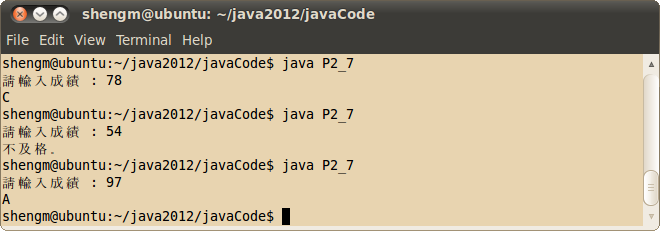
程式碼,如下。
import java.util.Scanner;
class P2_7{
public static void main(String[] args){
Scanner stdIn = new Scanner(System.in);
System.out.print("請輸入成績 : ");
int studentGrade = stdIn.nextInt();
if(studentGrade > 100 || studentGrade < 0){
System.out.println("輸入錯誤");
}else if(studentGrade >= 90 && studentGrade <= 100){
System.out.println("A");
}else if(studentGrade >= 80 && studentGrade <= 89){
System.out.println("B");
}else if(studentGrade >= 70 && studentGrade <= 79){
System.out.println("C");
}else if(studentGrade >= 60 && studentGrade <= 69){
System.out.println("D");
}else {
System.out.println("不及格。");
}
}
}
執行結果,如下。
2012年3月31日 星期六
練習題 2_3 : 判斷是否能整除
由鍵盤輸入 A、B兩數,判斷 A 是否能被B整除。
執行結果,如下。

程式碼,如下。
import java.util.Scanner;
public class EX2_3 {
public static void main(String[] args) {
Scanner std = new Scanner(System.in);
System.out.println("請輸入任意兩個數字");
System.out.print("數字 A 》》》》》 ");
double x = std.nextDouble();
System.out.print("數字 B 》》》》》 ");
double y = std.nextDouble();
if(x%y == 0){
double times = x/y;
System.out.println("A是B的" + times + " 倍。" );
}else{
System.out.println("A不可以被B整除。");
}
}
}
執行結果,如下。
程式碼,如下。
import java.util.Scanner;
public class EX2_3 {
public static void main(String[] args) {
Scanner std = new Scanner(System.in);
System.out.println("請輸入任意兩個數字");
System.out.print("數字 A 》》》》》 ");
double x = std.nextDouble();
System.out.print("數字 B 》》》》》 ");
double y = std.nextDouble();
if(x%y == 0){
double times = x/y;
System.out.println("A是B的" + times + " 倍。" );
}else{
System.out.println("A不可以被B整除。");
}
}
}
2012年3月28日 星期三
練習題 2_2:判斷兩數差距
判斷兩數是否差距 5.5 以上,使用 Math.abs 方法,取絕對值。
執行結果,如下 :

程式碼。如下 :
import java.util.Scanner;
public class EX2_2 {
public static void main(String[] args) {
Scanner std = new Scanner(System.in);
System.out.print("請輸入數字一 》》》》》 ");
double number1 = std.nextDouble();
System.out.print("請輸入數字二 》》》》》 ");
double number2 = std.nextDouble();
double sub = number1 - number2;
String response;
if(Math.abs(sub) >= 5.5){
response = "二數相差大於或等於 5.5";
}else{
response = "二數相差小於 5.5";
}
System.out.println(response);
}
}
執行結果,如下 :
程式碼。如下 :
import java.util.Scanner;
public class EX2_2 {
public static void main(String[] args) {
Scanner std = new Scanner(System.in);
System.out.print("請輸入數字一 》》》》》 ");
double number1 = std.nextDouble();
System.out.print("請輸入數字二 》》》》》 ");
double number2 = std.nextDouble();
double sub = number1 - number2;
String response;
if(Math.abs(sub) >= 5.5){
response = "二數相差大於或等於 5.5";
}else{
response = "二數相差小於 5.5";
}
System.out.println(response);
}
}
jAG111
class MyAG111{
public static void main(String[] args){
int x = 10 ;
int y = 5;
if x == y
System.out.println("相等。");
else
System.out.println("不相等。");
}
}
運用 if 判斷式的小程式,你能發現有幾個編譯錯誤??
2012年3月20日 星期二
jAG303
import java.io.*;
import java.lang.*;
public class MyAG303 {
public static void main(String[] args) throws Exception{
BufferedReader in =
new BufferedReader(new InputStreamReader(System.in));
int a[]=
{2,3,25,7,11,10,5,1,18,13,21,15,25,31,28,36,17,8,19,30};
int key;
boolean found=false;
System.out.println( "請輸入要搜尋的整數:" );
key=Integer.parseInt(in.readLine());
for ( int i=0;i<a.length;i++ ) {
if (a[i]==key)
System.out.println( "要尋找的值是陣列的第" + i+"個元素" );
found=true;
}
if (!found)
System.out.println( "找不到要尋找的值" );
}
}
當輸入的值找不到時,沒有輸出?? 你找得到嗎??
import java.lang.*;
public class MyAG303 {
public static void main(String[] args) throws Exception{
BufferedReader in =
new BufferedReader(new InputStreamReader(System.in));
int a[]=
{2,3,25,7,11,10,5,1,18,13,21,15,25,31,28,36,17,8,19,30};
int key;
boolean found=false;
System.out.println( "請輸入要搜尋的整數:" );
key=Integer.parseInt(in.readLine());
for ( int i=0;i<a.length;i++ ) {
if (a[i]==key)
System.out.println( "要尋找的值是陣列的第" + i+"個元素" );
found=true;
}
if (!found)
System.out.println( "找不到要尋找的值" );
}
}
當輸入的值找不到時,沒有輸出?? 你找得到嗎??
2012年3月17日 星期六
學習範例 2_6:選擇姓名(2)
使用 switch...case,重新編寫,學習範例2_6。
程式碼,如下。
import java.util.Scanner;
class P2_6{
public static void main(String[] args){
Scanner stdIn = new Scanner(System.in);
System.out.print("1)張三 2)李四 3)王五 \n 請選擇 : ");
int number = stdIn.nextInt();
String name = "";
switch(number){
case 1 : name = "張三";
break;
case 2 : name = "李四";
break;
case 3 : name = "王五";
break;
default : name = "輸入錯誤";
}
System.out.println(name);
}
}
執行結果,如下。

程式碼,如下。
import java.util.Scanner;
class P2_6{
public static void main(String[] args){
Scanner stdIn = new Scanner(System.in);
System.out.print("1)張三 2)李四 3)王五 \n 請選擇 : ");
int number = stdIn.nextInt();
String name = "";
switch(number){
case 1 : name = "張三";
break;
case 2 : name = "李四";
break;
case 3 : name = "王五";
break;
default : name = "輸入錯誤";
}
System.out.println(name);
}
}
執行結果,如下。
學習範例 2_5:選擇姓名(1)
程式碼,如下。
import java.util.Scanner;
class P2_5{
public static void main(String[] args){
Scanner stdIn = new Scanner(System.in);
System.out.print("1)張三 2)李四 3)王五 \n 請選擇 : ");
int number = stdIn.nextInt();
String name = "";
if(number == 1){
name = "張三";
}else if(number == 2){
name = "李四";
}else if(number == 3){
name = "王五";
}else{
name ="輸入錯誤";
}
System.out.println(name);
}
}
執行結果,如下。

import java.util.Scanner;
class P2_5{
public static void main(String[] args){
Scanner stdIn = new Scanner(System.in);
System.out.print("1)張三 2)李四 3)王五 \n 請選擇 : ");
int number = stdIn.nextInt();
String name = "";
if(number == 1){
name = "張三";
}else if(number == 2){
name = "李四";
}else if(number == 3){
name = "王五";
}else{
name ="輸入錯誤";
}
System.out.println(name);
}
}
執行結果,如下。
學習範例 2_4:判斷成績
判斷成績是否在 80~90, 顯示 B 。
程式碼,如下。
import java.util.Scanner;
class P2_4{
public static void main(String[] args){
Scanner stdIn = new Scanner(System.in);
System.out.print("請輸入成績 : ");
int studentGrade = stdIn.nextInt();
if(studentGrade >= 80 && studentGrade < 90) //如果成績介於 79~90 之間
System.out.println("B");
else
System.out.println("不是B");
}
}
執行結果,如下。

程式碼,如下。
import java.util.Scanner;
class P2_4{
public static void main(String[] args){
Scanner stdIn = new Scanner(System.in);
System.out.print("請輸入成績 : ");
int studentGrade = stdIn.nextInt();
if(studentGrade >= 80 && studentGrade < 90) //如果成績介於 79~90 之間
System.out.println("B");
else
System.out.println("不是B");
}
}
執行結果,如下。
學習範例 2_3:判斷輸入成績是否正確
判斷輸入的成績是否在 0~100之間。
程式碼,如下。
import java.util.Scanner;
class P2_3{
public static void main(String[] args){
Scanner stdIn = new Scanner(System.in);
System.out.print("請輸入成績 : ");
int studentGrade = stdIn.nextInt();
if(studentGrade < 0 || studentGrade > 100) //如果成績小於 0,或是大於 100
System.out.println("輸入錯誤!!請重新輸入。");
else
System.out.println("輸入完成。");
}
}
執行結果,如下。

程式碼,如下。
import java.util.Scanner;
class P2_3{
public static void main(String[] args){
Scanner stdIn = new Scanner(System.in);
System.out.print("請輸入成績 : ");
int studentGrade = stdIn.nextInt();
if(studentGrade < 0 || studentGrade > 100) //如果成績小於 0,或是大於 100
System.out.println("輸入錯誤!!請重新輸入。");
else
System.out.println("輸入完成。");
}
}
執行結果,如下。
2012年3月15日 星期四
學習範例 2_2:判斷奇、偶數
運用 if 判斷式,判斷奇偶數。
執行結果,如下。

程式碼,如下。
import java.util.Scanner;
public class P2_2 {
public static void main(String[] args) {
Scanner stdIn = new Scanner(System.in);
System.out.print("輸入任意數字 》》》》》 ");
double n = stdIn.nextDouble();
if (n / 2 == 0) {
System.out.println("偶數");
} else {
System.out.println("奇數");
}
}
}
執行結果,如下。
程式碼,如下。
import java.util.Scanner;
public class P2_2 {
public static void main(String[] args) {
Scanner stdIn = new Scanner(System.in);
System.out.print("輸入任意數字 》》》》》 ");
double n = stdIn.nextDouble();
if (n / 2 == 0) {
System.out.println("偶數");
} else {
System.out.println("奇數");
}
}
}
2012年3月13日 星期二
你的第一個 JSF 專案
1. 建置 Web Application Server - Tomcat
下載網址 : http://tomcat.apache.org/
2. 下載 Mojarra JSF 執行套件
The JSF team at GlassFish has announced a new name for the project: Mojarra (as in the fish - although La Mojarra is also an interesting linkage).
Ryan and Jason provide details on the why, but in a nutshell: "Mojarra" is is much shorter than "the JSF Production-Quality Reference Implementation from GlassFish".
下載網址 : http://javaserverfaces.java.net/
3. 建立 JSF 專案目錄
login/
│ ├── lib
│ │ └── javax.faces.jar
│ └── web.xml
└── welcome.xhtml
4. 編寫 JSF 網頁
我們從登入頁面開始,如圖1-1。
登入頁面

程式碼 1-1 : login/web/index.xhtml
<?xml version="1.0" encoding="UTF-8"?>
<!DOCTYPE html PUBLIC "-//W3C//DTD XHTML 1.0 Transitional//EN"
"http://www.w3.org/TR/xhtml1/DTD/xhtml1-transitional.dtd">
<html xmlns="http://www.w3.org/1999/xhtml"
xmlns:h="http://java.sun.com/jsf/html">
<h:head>
<title>Welcome</title>
</h:head>
<h:body>
<h:form>
<h3>Please enter your name and password.</h3>
<table>
<tr>
<td>Name:</td>
<td><h:inputText value="#{user.name}"/></td>
</tr>
<tr>
<td>Password:</td>
<td><h:inputSecret value="#{user.password}"/></td>
</tr>
</table>
<p><h:commandButton value="Login" action="welcome"/></p>
</h:form>
</h:body>
</html>
程式碼 1-2 : login/web/welcome.xhtml
<?xml version="1.0" encoding="UTF-8"?>
<!DOCTYPE html PUBLIC "-//W3C//DTD XHTML 1.0 Transitional//EN"
"http://www.w3.org/TR/xhtml1/DTD/xhtml1-transitional.dtd">
<html xmlns="http://www.w3.org/1999/xhtml"
xmlns:h="http://java.sun.com/jsf/html">
<h:head>
<title>Welcome</title>
</h:head>
<h:body>
<h3>Welcome to JavaServer Faces, #{user.name}!</h3>
</h:body>
</html>
你的第一個 JSF 範例,是由以下 3 個部份所組成:
@ 登入頁面和歡迎頁面,分別為 index.xhtml 及 welcome.xhtml。
@ 一個 Java Bean 管理使用者資料(name、password),稱為 Managed Bean。Bean 是一個由 getter 和 setter 方法所組成的 Java 類別檔,這種類別檔用來取得和放入我們需要的屬性。程式碼 UserBean.java,如 程式碼 1-3。
@ 配置檔,web.xml 及 beans.xml。
5.撰寫 userBean.java (Managed Bean)
程式碼 1-3 : login/src/java/com/corejsf/UserBean.java
package com.corejsf;
import java.io.Serializable;
import javax.faces.bean.ManagedBean;
import javax.faces.bean.SessionScoped;
@ManagedBean(name="user")
@SessionScoped
public class UserBean implements Serializable {
private String name;
private String password;
public String getName() {
return this.name;
}
public void setName(String nameString) {
this.name = nameString;
}
public String getPassword() {
return this.password;
}
public void setPassword(String passWordString) {
this.password = passWordString;
}
}
6. 啟動 JSF 專案
在開始啟動 JSF 專案前,還有需要一個 web.xml,如 程式碼 1_4。
程式碼 1_4 : login/web/WEB-INF/web.xml
<?xml version="1.0" encoding="UTF-8"?>
<web-app xmlns:xsi="http://www.w3.org/2001/XMLSchema-instance"
xmlns="http://java.sun.com/xml/ns/javaee"
xmlns:web="http://java.sun.com/xml/ns/javaee/web-app_2_5.xsd"
xsi:schemaLocation="http://java.sun.com/xml/ns/javaee
http://java.sun.com/xml/ns/javaee/web-app_2_5.xsd"
version="2.5">
<servlet>
<servlet-name>Faces Servlet</servlet-name>
<servlet-class>javax.faces.webapp.FacesServlet</servlet-class>
</servlet>
<servlet-mapping>
<servlet-name>Faces Servlet</servlet-name>
<url-pattern>/faces/*</url-pattern>
</servlet-mapping>
<welcome-file-list>
<welcome-file>faces/index.xhtml</welcome-file>
</welcome-file-list>
<context-param>
<param-name>javax.faces.PROJECT_STAGE</param-name>
<param-value>Development</param-value>
</context-param>
</web-app>
檢查你的第一個 JSF 範例程式的檔案目錄(參考3.建立 JSF 專案目錄),打包成 war 檔,佈署上 server。以 tomcat 為例。
在你的第一個範例程式 login 資料夾下,輸入
jar -cvfM0 tomcat路徑/webapps/login.war ./


啟動 Tomcat

http://localhost:8080
應該要看到 Apache Tomcat 頁面,如圖 1-6。

在流灠器中輸入
http://localhost:8080/login

下載網址 : http://tomcat.apache.org/
2. 下載 Mojarra JSF 執行套件
The JSF team at GlassFish has announced a new name for the project: Mojarra (as in the fish - although La Mojarra is also an interesting linkage).
Ryan and Jason provide details on the why, but in a nutshell: "Mojarra" is is much shorter than "the JSF Production-Quality Reference Implementation from GlassFish".
下載網址 : http://javaserverfaces.java.net/
3. 建立 JSF 專案目錄
login/
├── index.xhtml
├── WEB-INF
│ ├── classes
│ │ └── com
│ │ └── corejsf
│ │ └── UserBean.class├── WEB-INF
│ ├── classes
│ │ └── com
│ │ └── corejsf
│ ├── lib
│ │ └── javax.faces.jar
│ └── web.xml
└── welcome.xhtml
4. 編寫 JSF 網頁
我們從登入頁面開始,如圖1-1。
登入頁面
圖1-1
這是一個簡單的 HTML 登入網頁,只使用了少數的一些標籤,如 程式碼 1-1。
程式碼 1-1 : login/web/index.xhtml
<?xml version="1.0" encoding="UTF-8"?>
<!DOCTYPE html PUBLIC "-//W3C//DTD XHTML 1.0 Transitional//EN"
"http://www.w3.org/TR/xhtml1/DTD/xhtml1-transitional.dtd">
<html xmlns="http://www.w3.org/1999/xhtml"
xmlns:h="http://java.sun.com/jsf/html">
<h:head>
<title>Welcome</title>
</h:head>
<h:body>
<h:form>
<h3>Please enter your name and password.</h3>
<table>
<tr>
<td>Name:</td>
<td><h:inputText value="#{user.name}"/></td>
</tr>
<tr>
<td>Password:</td>
<td><h:inputSecret value="#{user.password}"/></td>
</tr>
</table>
<p><h:commandButton value="Login" action="welcome"/></p>
</h:form>
</h:body>
</html>
XHTML,是一種類似於 HTML 同時支持 XML 的網頁寫法,在 JSF2.0 中,可以使用 .xhtml 做為網頁的副檔名。換句話說,一個 JSF 的網頁是類似於 HTML 的寫法,檔案格式為 XHTML。
h , 是一個標籤,在這個範例中,我們使用 JSF 中的 HTML 標籤庫 。在第 4 行,先宣告 namespace ,第 5 行,宣告 h 標籤是關於 html 的進階標籤。 <h:head> <h:body> <h:form> 就如同 HEML 中的 <head> <body> <form>。
在 JSF 的標籤庫中,還有另一種標籤是和 HTML 沒有太大的相關性,core ,如果需要使用這個標籤,必須宣告另一個 namespace :
你也可以自行定義標籤的名稱,而不使用 h 或是 f。如同 HTML,XHTML 中的標籤從 <標籤:xxx> 開始 </標籤:XXX> 結束。
<h:form> 會產生一個表單,<h:inputText> 是文字區,連結到 user 這個物件中的 name 屬性。<h:inputSecret> 輸入密碼區,連結到 user 這個物件的 password 屬性。這個部份,我們將在下一個段落 "撰寫 userBean.java (Managed Bean)" 中在討論。<h:commandButton> 會產生一個 "Login" 的提交按鈕,在 action 屬性中指定當這個按鈕被按下時,將會到那一個頁面。
所以,當使用者輸入了姓名、密碼,按下 "Login" 按鈕後,welcome.xhtml 檔案就會被展示出來,如圖 1-2。

h , 是一個標籤,在這個範例中,我們使用 JSF 中的 HTML 標籤庫 。在第 4 行,先宣告 namespace ,第 5 行,宣告 h 標籤是關於 html 的進階標籤。 <h:head> <h:body> <h:form> 就如同 HEML 中的 <head> <body> <form>。
在 JSF 的標籤庫中,還有另一種標籤是和 HTML 沒有太大的相關性,core ,如果需要使用這個標籤,必須宣告另一個 namespace :
xmlns:f="http://java.sun.com/jsf/core"
你也可以自行定義標籤的名稱,而不使用 h 或是 f。如同 HTML,XHTML 中的標籤從 <標籤:xxx> 開始 </標籤:XXX> 結束。
<h:form> 會產生一個表單,<h:inputText> 是文字區,連結到 user 這個物件中的 name 屬性。<h:inputSecret> 輸入密碼區,連結到 user 這個物件的 password 屬性。這個部份,我們將在下一個段落 "撰寫 userBean.java (Managed Bean)" 中在討論。<h:commandButton> 會產生一個 "Login" 的提交按鈕,在 action 屬性中指定當這個按鈕被按下時,將會到那一個頁面。
所以,當使用者輸入了姓名、密碼,按下 "Login" 按鈕後,welcome.xhtml 檔案就會被展示出來,如圖 1-2。
圖 1-2
程式碼 1-2 : login/web/welcome.xhtml
<?xml version="1.0" encoding="UTF-8"?>
<!DOCTYPE html PUBLIC "-//W3C//DTD XHTML 1.0 Transitional//EN"
"http://www.w3.org/TR/xhtml1/DTD/xhtml1-transitional.dtd">
<html xmlns="http://www.w3.org/1999/xhtml"
xmlns:h="http://java.sun.com/jsf/html">
<h:head>
<title>Welcome</title>
</h:head>
<h:body>
<h3>Welcome to JavaServer Faces, #{user.name}!</h3>
</h:body>
</html>
你的第一個 JSF 範例,是由以下 3 個部份所組成:
@ 登入頁面和歡迎頁面,分別為 index.xhtml 及 welcome.xhtml。
@ 一個 Java Bean 管理使用者資料(name、password),稱為 Managed Bean。Bean 是一個由 getter 和 setter 方法所組成的 Java 類別檔,這種類別檔用來取得和放入我們需要的屬性。程式碼 UserBean.java,如 程式碼 1-3。
@ 配置檔,web.xml 及 beans.xml。
5.撰寫 userBean.java (Managed Bean)
程式碼 1-3 : login/src/java/com/corejsf/UserBean.java
package com.corejsf;
import java.io.Serializable;
import javax.faces.bean.ManagedBean;
import javax.faces.bean.SessionScoped;
@ManagedBean(name="user")
@SessionScoped
public class UserBean implements Serializable {
private String name;
private String password;
public String getName() {
return this.name;
}
public void setName(String nameString) {
this.name = nameString;
}
public String getPassword() {
return this.password;
}
public void setPassword(String passWordString) {
this.password = passWordString;
}
}
6. 啟動 JSF 專案
在開始啟動 JSF 專案前,還有需要一個 web.xml,如 程式碼 1_4。
程式碼 1_4 : login/web/WEB-INF/web.xml
<?xml version="1.0" encoding="UTF-8"?>
<web-app xmlns:xsi="http://www.w3.org/2001/XMLSchema-instance"
xmlns="http://java.sun.com/xml/ns/javaee"
xmlns:web="http://java.sun.com/xml/ns/javaee/web-app_2_5.xsd"
xsi:schemaLocation="http://java.sun.com/xml/ns/javaee
http://java.sun.com/xml/ns/javaee/web-app_2_5.xsd"
version="2.5">
<servlet>
<servlet-name>Faces Servlet</servlet-name>
<servlet-class>javax.faces.webapp.FacesServlet</servlet-class>
</servlet>
<servlet-mapping>
<servlet-name>Faces Servlet</servlet-name>
<url-pattern>/faces/*</url-pattern>
</servlet-mapping>
<welcome-file-list>
<welcome-file>faces/index.xhtml</welcome-file>
</welcome-file-list>
<context-param>
<param-name>javax.faces.PROJECT_STAGE</param-name>
<param-value>Development</param-value>
</context-param>
</web-app>
檢查你的第一個 JSF 範例程式的檔案目錄(參考3.建立 JSF 專案目錄),打包成 war 檔,佈署上 server。以 tomcat 為例。
在你的第一個範例程式 login 資料夾下,輸入
jar -cvfM0 tomcat路徑/webapps/login.war ./
圖 1-3
到 tomcat路徑/webapps 檢查看看剛剛佈署的 login.war。如下圖。
圖 1-4
啟動 Tomcat
tomcat路徑/bin/startup.sh
圖 1-5
在流灠器中輸入 http://localhost:8080
應該要看到 Apache Tomcat 頁面,如圖 1-6。
圖 1-6
7. 執行 JSF 專案在流灠器中輸入
http://localhost:8080/login
圖 1-7
2012年3月12日 星期一
練習題 2_1:判斷成績
運用 if 判斷式,60分以下,顯示“不及格”,60分顯示“剛好 60分”,60分以上顯示“及格”。
執行結果。

程式碼,如下。
import java.util.Scanner;
public class P2_1 {
public static void main(String[] args) {
Scanner stdIn = new Scanner(System.in);
System.out.print("請輸入成績 》》》》》 ");
Double grade = stdIn.nextDouble();
if (grade > 60) {
System.out.println("----- 及格 -----");
} else if(grade < 60){
System.out.println("----- 不及格 -----");
}else if(grade == 60){
System.out.println("----- 剛好 60 分 -----");
}
}
}
執行結果。
程式碼,如下。
import java.util.Scanner;
public class P2_1 {
public static void main(String[] args) {
Scanner stdIn = new Scanner(System.in);
System.out.print("請輸入成績 》》》》》 ");
Double grade = stdIn.nextDouble();
if (grade > 60) {
System.out.println("----- 及格 -----");
} else if(grade < 60){
System.out.println("----- 不及格 -----");
}else if(grade == 60){
System.out.println("----- 剛好 60 分 -----");
}
}
}
jAG110
//輸入學生成績,當成績大於或等於 90 分時,輸出顯示 A
import java.util.Scanner;
class MyAG110{
public static void main(String[] args){
Scanner stdIn = new Scanner(System.in);
System.out.print("請輸入成績 : ");
int studentGrade = stdIn.nextInt();
if(!(studentGrade => 60)) //如果成績大於 60
System.out.println("A");
}
}
這一個 if 判斷式,有幾個編譯怒憤?
}
這一個 if 判斷式,有幾個編譯怒憤?
學習範例 2_1:判斷成績是否及格
運用 if 判斷式,判斷輸入的成績是否及格,60 分以上及格,59 以下不及格。if 判斷式。
import java.util.Scanner;
public class Ex2_1 {
public static void main(String[] args) {
Scanner stdIn = new Scanner(System.in);
System.out.print("請輸入成績 》》》》》 ");
Double grade = stdIn.nextDouble();
if (grade >= 60) {
System.out.println("----- 及格 -----");
} else {
System.out.println("----- 不及格 -----");
}
}
}
執行結果。

import java.util.Scanner;
public class Ex2_1 {
public static void main(String[] args) {
Scanner stdIn = new Scanner(System.in);
System.out.print("請輸入成績 》》》》》 ");
Double grade = stdIn.nextDouble();
if (grade >= 60) {
System.out.println("----- 及格 -----");
} else {
System.out.println("----- 不及格 -----");
}
}
}
執行結果。
2012年3月9日 星期五
學習範例 1_6:顯示日期與時間
使用 Date Class, 顯示系統當前日期與時間。
import java.util.Date;
public class Ex1_6{
public static void main(String[] args){
Date date = new Date();
System.out.println(date);
}
}
執行結果,如下。

import java.util.Date;
public class Ex1_6{
public static void main(String[] args){
Date date = new Date();
System.out.println(date);
}
}
執行結果,如下。
訂閱:
文章 (Atom)

 發表文章
發表文章



